Seedance 2.5 is live Limited-time offer: up to 51% off, from just $0.046/sec
Upgrade Now

ChatCut plugin for ChatGPT

Enter the prompt below into any task on your ChatGPT desktop app

/goal Read chatcut.io/chatgpt to install the ChatCut plugin and set up a new task for me.
/goal Read chatcut.io/desktop-plugin to install the ChatCut plugin and set up a new task for me.
ChatWork
What should we do today?
IMG_4822.MOV
ChatCut
Worked for 22m 40s

Full access 5.6 SolHigh
Choose project Plugins
MY ASSETSLIBRARYTRANSCRIPT
Motion GraphicsLUTsZoomFX
FavoritePopular
Quote Card
GDP Chart
Apple Sales
Lower Third
00:00:00:00 / 00:00:19:27 OFF
00:00:0000:00:0500:00:1000:00:15
MGGraphics
Favorite Card Midnights Overlay Top 5
V1Video 1
Open Take A Take B Take C Take D Take E CTA
A1Music
IMG_4822 IMG_4822 Music

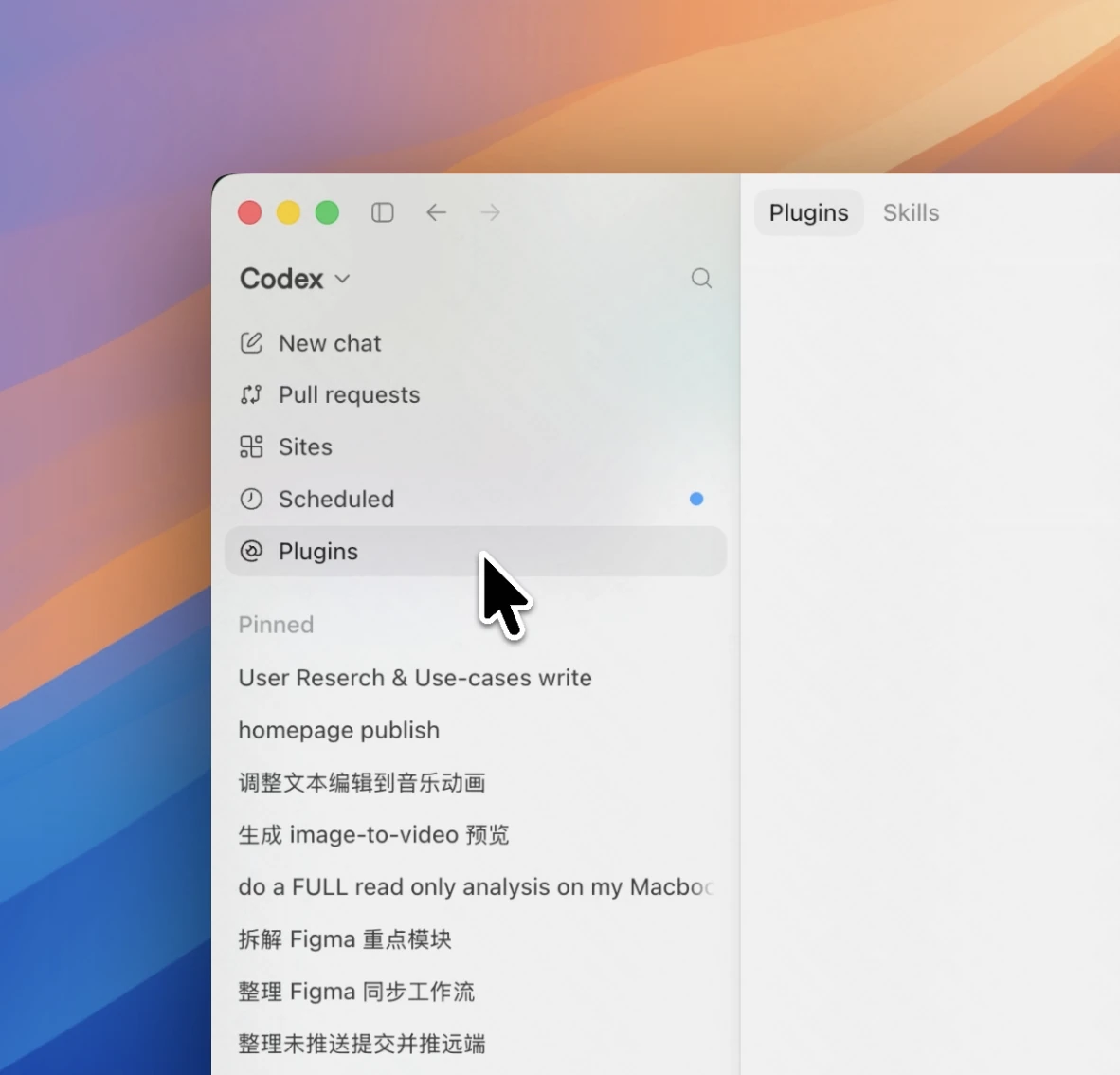
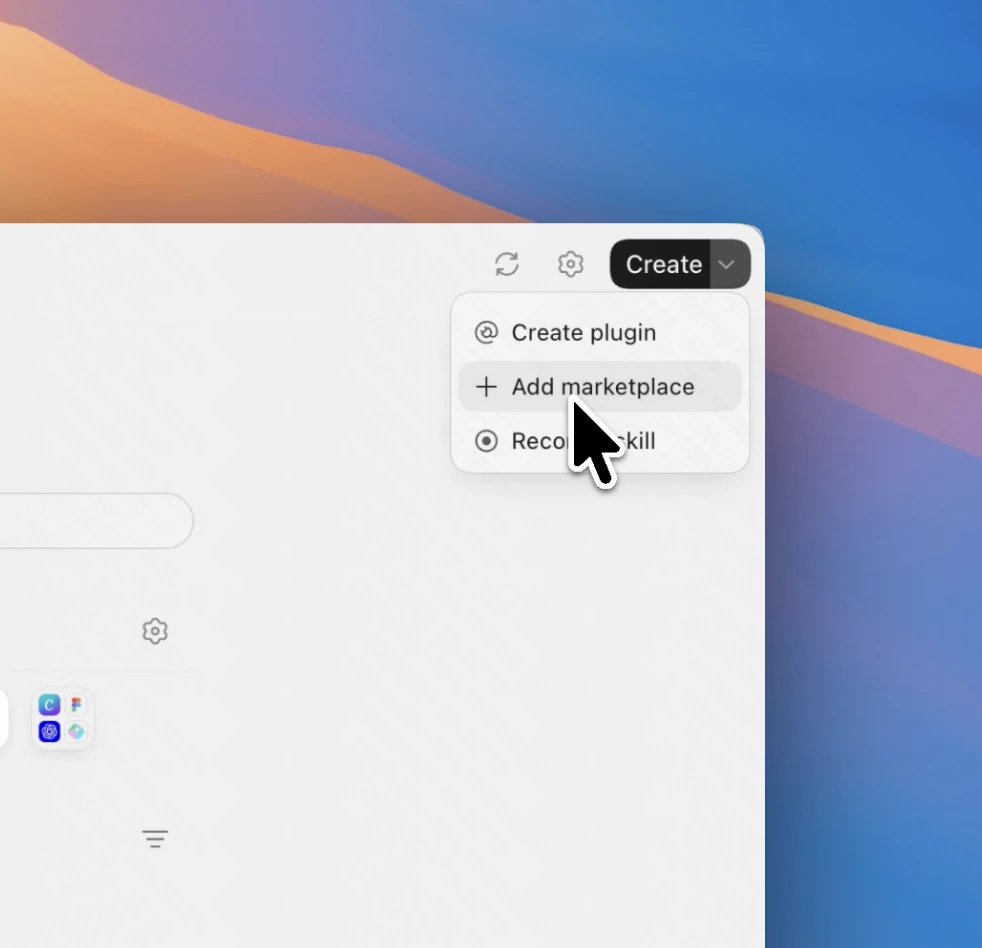
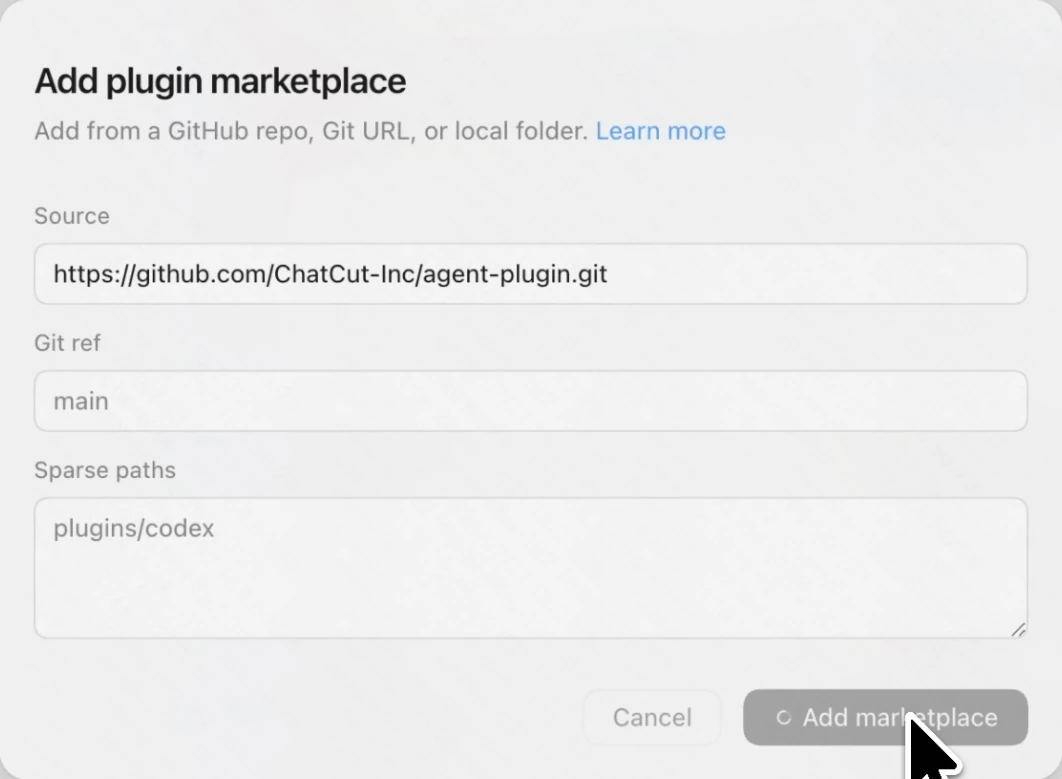
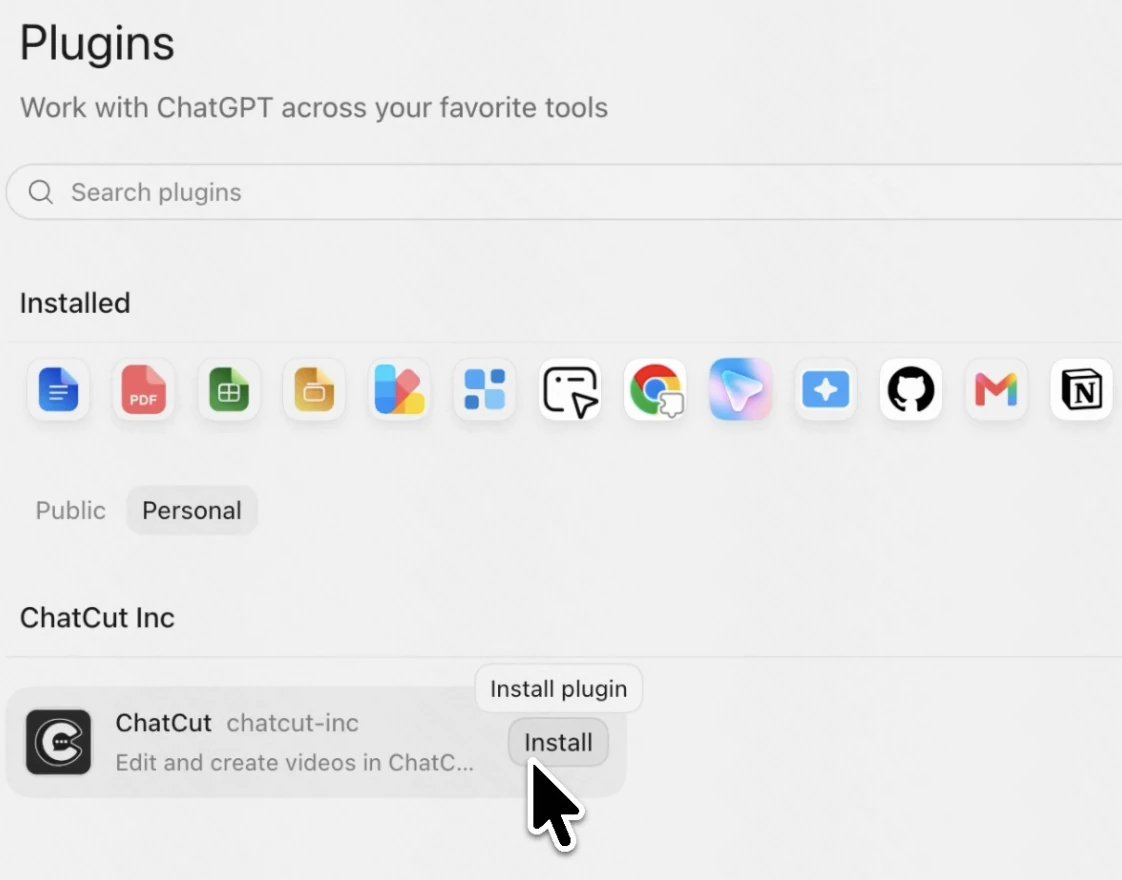
Install in four steps

Add the ChatCut marketplace to ChatGPT manually — takes about a minute.

  1. Open Plugins from the sidebar

    1. Open Plugins from the sidebar

  2. Click Create, then Add marketplace

    2. Click Create, then Add marketplace

  3. Paste

    3. Paste and click "Add marketplace"

  4. Open the Personal tab, find ChatCut and click Install

    4. Open the Personal tab, find ChatCut and click Install

What can ChatCut
do in ChatGPT

Pick a job on the left and ChatCut runs it right inside ChatGPT — no new app, no export, no context switch.

Edit video···
/goal Read chatcut.io/chatgpt to install the ChatCut plugin and set up a new task for me.
+ Full access 5.6 Sol Medium

Top ChatCut Use CasesFor You Try In ChatGPT

Describe the video you want to create. ChatCut works inside ChatGPT to generate clips, add AI captions, create motion graphics, arrange everything on a real timeline, and deliver a finished video without moving between tools, nailing a number of use cases.

Copy & paste into ChatGPT:
/goal Read chatcut.io/chatgpt to install the ChatCut plugin and set up a new task for me.
Talking-head edits

Creator · captions · motion graphics

A creator cut tightened from raw footage, captions and motion graphics added.

Long to short

Podcast · vertical short · captions

A 47-minute episode scanned for its strongest beat, cut to a 9:16 short.

App promos

App demo · e-commerce · captions

A product page turned into a hands-on app promo with captioned benefit beats.

Generated hooks

Cold open · captions · vertical

A scroll-stopping cold-open generated to front-load the payoff, captions baked in.

Product ads

E-commerce · ASMR · vertical

A charging-cable demo cut into a scroll-stopping vertical ad, captions on.

Creator reviews

UGC review · talking head · captions

A hands-on mic review cut from raw footage, fillers out, captions in.

Talking-head edits

Creator · captions · motion graphics

A creator cut tightened from raw footage, captions and motion graphics added.

Long to short

Podcast · vertical short · captions

A 47-minute episode scanned for its strongest beat, cut to a 9:16 short.

App promos

App demo · e-commerce · captions

A product page turned into a hands-on app promo with captioned benefit beats.

Generated hooks

Cold open · captions · vertical

A scroll-stopping cold-open generated to front-load the payoff, captions baked in.

Product ads

E-commerce · ASMR · vertical

A charging-cable demo cut into a scroll-stopping vertical ad, captions on.

Creator reviews

UGC review · talking head · captions

A hands-on mic review cut from raw footage, fillers out, captions in.

Talking-head edits

Creator · captions · motion graphics

A creator cut tightened from raw footage, captions and motion graphics added.

Get Complete AI Video Editing Support Inside ChatGPT

ChatCut routes each request to the right editing tool and applies it on a live timeline. Nothing bakes into a flat export, so you can retime, rewrite, or rearrange endlessly.

Ask ChatGPT to edit a video and it turns on the ChatCut plugin — ChatCut's timeline, player, and asset panels slide in next to ChatGPT.
$25 /month

Billed monthly

100 credits / month

Get started
  • Seedance 2.5 (up to 263s of video)
  • Seedance 2.0 (up to 357s of video)
  • Kling 3.0 (up to 166s of video)
  • GPT Image 2 (up to 454 images)
  • Nano Banana 2 (up to 312 images)
  • Motion graphics (up to 500 clips)
  • AI music (up to 555 songs)
  • Motion graphics transparent export
  • All AI agent editing capabilities
$45 $50 /month 10% off

Billed monthly

200 credits / month

Get started
  • Seedance 2.5 (up to 526s of video)
  • Seedance 2.0 (up to 714s of video)
  • Kling 3.0 (up to 333s of video)
  • GPT Image 2 (up to 909 images)
  • Nano Banana 2 (up to 625 images)
  • Motion graphics (up to 1,000 clips)
  • AI music (up to 1,111 songs)
  • Motion graphics transparent export
  • All AI agent editing capabilities
$88 $100 /month 12% off

Billed monthly

400 credits / month

Get started
  • Seedance 2.5 (up to 1,052s of video)
  • Seedance 2.0 (up to 1,428s of video)
  • Kling 3.0 (up to 666s of video)
  • GPT Image 2 (up to 1,818 images)
  • Nano Banana 2 (up to 1,250 images)
  • Motion graphics (up to 2,000 clips)
  • AI music (up to 2,222 songs)
  • Motion graphics transparent export
  • All AI agent editing capabilities
$160 $200 /month 20% off

Billed monthly

800 credits / month

Get started
  • 800 credits / month
  • 1,200 credits / month
  • 2,000 credits / month
  • 3,000 credits / month
  • 4,000 credits / month
  • 5,000 credits / month
  • 7,500 credits / month
  • 10,000 credits / month
  • Seedance 2.5 (up to 2,105s of video)
  • Seedance 2.0 (up to 2,857s of video)
  • Kling 3.0 (up to 1,333s of video)
  • GPT Image 2 (up to 3,636 images)
  • Nano Banana 2 (up to 2,500 images)
  • Motion graphics (up to 4,000 clips)
  • AI music (up to 4,444 songs)
  • Motion graphics transparent export
  • All AI agent editing capabilities

Frequently asked questions

What is the ChatCut plugin for ChatGPT?

ChatCut is an AI video editing plugin for ChatGPT. It lets you create, edit, and refine videos with prompts, while keeping video generation, timeline editing, captions, voiceovers, motion graphics, and audio cleanup in one workflow.

What happened to the ChatCut Codex plugin?

It's the same plugin. OpenAI merged Codex into ChatGPT in July 2026, so the ChatCut Codex plugin is now the ChatCut plugin for ChatGPT — same install, same tools, and it works in both the Work and Codex tabs.

What can I create with ChatCut in ChatGPT?

You can create short-form videos, talking-head edits, product demos, explainer videos, UGC-style ads, podcast highlights, captioned reels, AI-generated B-roll, and motion graphic videos. ChatCut can turn scripts, prompts, images, and existing footage into ready-to-use video edits.

Do I have to leave ChatGPT to edit a video?

No. ChatCut works inside ChatGPT — in both the Work and Codex tabs — so you can describe the edit, generate video assets, add captions, clean audio, arrange clips, and refine the timeline without switching to a separate video editor.

Can I use my own footage in ChatCut?

Yes. You can use your own recordings, product clips, screen captures, podcast footage, or social media assets. ChatCut can trim footage, remove background noise, add captions, insert motion graphics, generate B-roll, and combine everything on a multi-track timeline.

How do I install the ChatCut plugin in ChatGPT?

ChatCut works in the ChatGPT desktop app (Mac and Windows, every plan including Free). Paste the install prompt into any chat — Work or Codex tab — and ChatGPT installs ChatCut for you. Web and mobile ChatGPT can't install plugins.

When is the ChatCut plugin for ChatGPT available?

The ChatCut plugin for ChatGPT is being introduced as a video editing workspace for ChatGPT users. This page previews how ChatCut works inside ChatGPT and what users will be able to create, edit, and generate with it.

Why ChatCut in ChatGPT

Most ways to add AI video mean a new app, new logins, and credits to buy. The ChatCut plugin skips all of that.

Install once, edit in ChatGPT

Add the plugin and sign in once — no API keys to generate, store, or manage. You're editing in minutes, inside the ChatGPT you already use.

Every ChatCut tool, one connection

Cut, caption, motion graphics, voiceover, video generation — every ChatCut tool is reachable through the same connection.

Runs on your ChatGPT usage

ChatCut works inside your ChatGPT session and runs on the usage you already have — your existing plan carries over.

To install, paste this into ChatGPT:
/goal Read chatcut.io/chatgpt to install the ChatCut plugin and set up a new task for me.
Try ChatCut in ChatGPT Plugin Cut, caption, add motion graphics, and generate video — one agent, one timeline, right inside ChatGPT.